

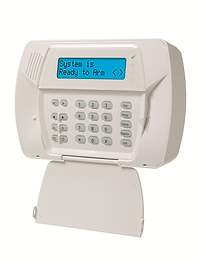
DSC Impassa & Alarm.com
The DSC Impassa is a wireless security panel that can be used with compatible Alarm.com services. If you already have an Impassa installed, you may be able to use your existing panel when activating compatible Alarm.com service through True-Link.
How to Find Your DSC Impassa IMEI
Using the keypad:
1. Press and hold [1] for 10 seconds. The serial number used for Alarm.com displays on the screen.
On the cellular module:
The serial number is printed on the cellular module following IMEI or SN.
Default Codes
Installer code: 5555
Master Code: 1234
Activating Your DSC Impassa with Alarm.com
To activate your DSC Impassa with True-Link, you'll need the equipment's IMEI or serial information and access to the system. Find the required identifier using the instructions below, then choose a True-Link Alarm.com plan and submit your activation information online. We can activate eligible systems remotely.